
Cyber Monday deals can make both smart home hubs and individual Wi-Fi devices look like an easy upgrade, but they solve different problems. A hub-based setup connects compatible lights, sensors, locks and other devices through a central controller; a Wi-Fi-only setup connects devices directly to your home network, often with each product managed through its own app. The main tradeoff is upfront cost and setup effort versus simplicity and lower entry cost. Choose a hub if you want devices to work together and plan to expand over time. Choose Wi-Fi-only products if you want one or two convenient upgrades without building a larger system. Since sale prices and compatibility vary by model, check the product requirements before buying.

Get the little things that make your day delivered free with Prime
- Fast, free delivery on millions of items
- Prime Video, Amazon Music and more included
- Member-only deals all year
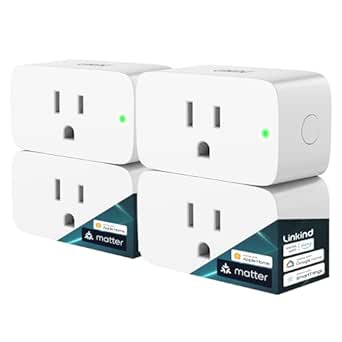
Linkind Matter Smart Plug, 4 Pack
- ✔ Connectivity: Matter and 2.4 GHz Wi-Fi
- ✔ Network requirement: IPv6
- ✔ Power capacity: 15 A, 1800 W

Amazon Echo Show 5 Smart Display (Newest Model), Charcoal
- ✔ Display: 5.5-inch touchscreen
- ✔ Camera: 2 MP with built-in shutter
- ✔ Speaker: 1.75-inch full-range

Kasa Smart Plug Ultra Mini 15A, EP10P2, 2-Pack
- ✔ Model: EP10P2
- ✔ Pack size: 2 plugs
- ✔ Maximum load: 15 A, 1800 W
At a Glance
| Criteria | A hub-based smart home setup | A Wi-Fi-only smart home setup | Winner |
|---|---|---|---|
| Upfront cost | Usually higher because a hub adds another purchase; bundles may reduce the total. | Usually cheaper to start, especially for a single bulb, plug or camera. | B |
| Setup and daily use | Requires choosing a compatible hub and linking devices, then offers one central place for supported controls. | Often quick to install, but each brand may require its own app, account and setup. | B |
| Cross-device automation | Stronger potential: compatible devices can trigger actions across rooms and product types. | Basic schedules and voice assistant routines are common; cross-brand coordination can be limited or uneven. | A |
| Compatibility and choice | Depends on the hub and its supported protocols; verify each device works with the chosen system. | Broad product choice, but app, assistant and platform support should be checked for each device. | Depends |
| Network demands | Can reduce the number of devices connecting directly to Wi-Fi, depending on the hub and device protocols. | Every Wi-Fi device uses the home network; several devices can add network and app-management overhead. | A |
| Reliability and local control | Some systems support local automations, but features vary by hub and connected devices. | Cloud access and vendor support vary; functions may be limited if a service or internet connection is unavailable. | Depends |
| Long-term value | Can pay off for a growing setup if shared automations replace separate controls and routines. | Good value for a few devices; extra apps or replacement costs may erode savings in a larger system. | Depends |
Linkind Matter Smart Plug, 4 Pack
The Linkind Matter Smart Plug four-pack takes our top spot because it can serve several rooms while fitting into a range of Matter-compatible smart home platforms. Apple Home, Alexa, Google Home, and SmartThings are all listed as supported, giving it broader reach than the Kasa two-pack. That breadth is especially useful when a household has more than one assistant or expects to build its setup over time.Once configured, LAN control can continue during an internet outage, and schedules, timers, remote control, and voice commands cover everyday automation. The four plugs also make it more practical for automating several lamps or small appliances in one go. The stated 15 A, 1800 W capacity and short-circuit and overload protection provide useful operating and safety details, though buyers should still check the needs of each appliance before connecting it.The tradeoff is setup. Linkind needs 2.4 GHz Wi-Fi and IPv6, and most supported platforms require a compatible Matter hub or controller. The AiDot app can be used without one, but buyers who want Apple Home or another listed platform should verify their setup first. Kasa is the easier hub-free choice for Alexa and Google homes; Linkind makes more sense when multi-platform flexibility and a four-plug pack matter more than the simplest start.
Pros:
- Four plugs can cover several rooms or appliances.
- Matter support includes Apple Home, Alexa, Google Home, and SmartThings.
- LAN control is available after setup when internet service is offline.
- Schedules, timers, remote control, and voice commands support varied routines.
Cons:
- Requires 2.4 GHz Wi-Fi and IPv6.
- Most listed platforms need a compatible Matter hub or controller.
Best for: Households automating several appliances and using, or planning to use, a compatible Matter platform and controller.
Not ideal for: Buyers who want plug-and-play setup without checking IPv6, 2.4 GHz Wi-Fi, or Matter controller compatibility.
Bottom line: We recommend Linkind for buyers who want the broadest platform flexibility and several plugs, and who can meet its network and controller requirements.
“We recommend Linkind for buyers who want the broadest platform flexibility and several plugs, and who can meet its network and controller requirements.”
Amazon Echo Show 5 Smart Display (Newest Model), Charcoal
Where the two plug packs automate appliances, the Echo Show 5 makes smart home control visible. Its 5.5-inch touchscreen can show news, weather, photos, and compatible camera views, while the built-in Alexa experience gives us another way to control compatible devices. That makes it a different sort of Cyber Monday pick: it can become a useful bedside or kitchen display even when we are not actively adjusting a plug.The camera and built-in speaker add video calls and media playback to that role. A physical camera shutter and a microphone and camera off button give us direct privacy controls. Its compact footprint is suited to a desk or nightstand, and the listed materials include recycled polyester yarn and recycled aluminum. Compared with Linkind, it does not give us four outlets to automate; compared with Kasa, it offers a screen, camera, and speaker rather than a simple hub-free plug setup.Those extra capabilities come with a narrower fit. This is an Alexa-centered display, so it is less compelling for a home organized around another assistant. Some skills and services may involve subscriptions or other fees, and it does not support ad-hoc or peer-to-peer Wi-Fi networks. We should choose it when a shared screen and room controls solve a real need, rather than expecting it to replace a multipack of smart plugs.
Pros:
- 5.5-inch touchscreen brings smart home controls and information into view.
- Camera supports video calls and viewing compatible cameras.
- Camera shutter and microphone and camera off button offer physical privacy controls.
- Compact size and built-in speaker suit bedside tables, kitchens, and desks.
Cons:
- Does not provide multiple smart outlets like either plug pack.
- Some skills and services may require subscriptions or other fees.
- Does not support ad-hoc or peer-to-peer Wi-Fi networks.
Best for: Alexa households that want a compact screen for room controls, compatible camera viewing, photos, media, and video calls.
Not ideal for: Buyers seeking a set of smart outlets, or those who do not want an Alexa-oriented screen and camera in the room.
Bottom line: We would choose Echo Show 5 when a compact Alexa display improves a room, rather than when the main goal is automating several appliances.
“We would choose Echo Show 5 when a compact Alexa display improves a room, rather than when the main goal is automating several appliances.”
Kasa Smart Plug Ultra Mini 15A, EP10P2, 2-Pack
The Kasa Smart Plug Ultra Mini two-pack is our straightforward entry point for turning ordinary appliances into app or voice-controlled devices. It works over 2.4 GHz Wi-Fi with Kasa or Tapo and supports Alexa and Google Assistant. Unlike Linkind, it needs no hub, which makes setup more direct for buyers who already use one of those assistants and want to automate a pair of lamps or similar appliances.Its ultra-mini form factor leaves the second wall outlet available, a small practical advantage when outlets are scarce. Schedules, timers, and Away Mode let us automate routines or make a home appear occupied. The stated 15 A, 1800 W maximum load and UL certification help clarify its electrical capacity and certification. Compared with Linkind’s four plugs and wider Matter platform range, Kasa is a smaller, simpler commitment; compared with Echo Show 5, it adds no display or camera, but directly controls connected appliances.The limits are equally clear: 2.4 GHz Wi-Fi is required, and the listed voice assistants are Alexa and Google Assistant. Buyers seeking Apple Home, SmartThings, or broad Matter flexibility should look at Linkind instead. Kasa is the more sensible fit when hub-free setup and a compact two-plug starter pack are the priority, as long as the existing household ecosystem matches.
Pros:
- No hub required for setup.
- Compact design leaves the second wall outlet available.
- Supports app and voice control, schedules, timers, and Away Mode.
- Two-pack offers a simple way to automate a small starter set of appliances.
Cons:
- Requires a 2.4 GHz Wi-Fi connection.
- Voice assistant support is limited to Alexa and Google Assistant.
Best for: Buyers who use Alexa or Google Assistant and want two compact plugs with schedules and no hub requirement.
Not ideal for: Households that need Apple Home or SmartThings support, a Matter-based setup, or plugs that work outside 2.4 GHz Wi-Fi.
Bottom line: We recommend Kasa for a low-complexity two-plug setup in an Alexa or Google household that does not need Matter’s wider platform reach.
“We recommend Kasa for a low-complexity two-plug setup in an Alexa or Google household that does not need Matter’s wider platform reach.”
As an Amazon Associate we earn from qualifying purchases.
Key Differences
The cost gap is clearest at the start. Wi-Fi-only devices let you buy just the item you need, so a discounted bulb or smart plug can be a low-risk first step. A hub-based setup asks you to choose a compatible controller and spend time checking device support. That extra work makes more sense when the plan includes several devices: shared automations can make lights, sensors and other supported products act as one system instead of a collection of individual gadgets.
Compatibility is the deciding detail, not the word “smart” on the box. Wi-Fi products can be simple to install but may split controls between brand apps. A hub can unify compatible products, though it does not guarantee support for every device or feature. Check the exact model, supported platform and any required hub before purchasing a Cyber Monday bundle. A lower sale price is poor value if the device cannot join the setup you intend to use.
For a small upgrade, Wi-Fi-only is usually the more sensible buy. For a home that will grow, a hub can justify its higher cost through more useful routines and simpler central control. Neither approach is automatically more reliable: internet, router, cloud service, hub and device behavior all matter. If a feature must keep working during an internet outage, confirm that the specific product supports local operation.
Detailed Comparison
Upfront cost (A Wi-Fi-only smart home setup wins — moderate)
Wi-Fi-only wins for the first purchase because it avoids the hub expense and lets you buy only the device on sale. The gap is moderate for a small setup and can narrow when a hub is discounted in a bundle. For multiple devices, compare the complete setup cost rather than the sticker price of one item.
Setup and daily use (A Wi-Fi-only smart home setup wins — moderate)
Wi-Fi-only devices usually win on speed: connect the product, install its app and follow the setup steps. That is a minor-to-moderate advantage when buying one device. A hub adds planning and pairing, but may simplify everyday control later by bringing supported products into one system.
Cross-device automation (A hub-based smart home setup wins — major)
A hub-based setup usually wins when compatible products need to coordinate. A sensor might trigger a light or another supported action without relying on separate schedules in different apps. The advantage is major for a home built around routines, but minor if the goal is simply to turn one lamp on remotely.
Compatibility and choice (major difference)
This is a depends category. Wi-Fi-only shoppers can choose among many products, but must check app and assistant support. Hub shoppers may gain a unified system across supported devices, but the hub’s compatibility list can rule out a product or feature. Confirm exact model support before checkout; neither approach guarantees universal compatibility.
Network demands (A hub-based smart home setup wins — minor)
A hub can reduce direct Wi-Fi connections if it uses another supported protocol for connected devices, giving it an advantage in a device-heavy home. The size of that benefit depends on the products and hub. With only a few Wi-Fi devices, the difference is minor and unlikely to justify buying a hub by itself.
Reliability and local control (moderate difference)
Neither setup wins across the board. Some hubs can run selected automations locally, while some Wi-Fi products depend on cloud services for remote access or features. The practical gap can be major for households that need routines to survive an internet outage, so check local-control behavior for each specific device and automation.
Long-term value (moderate difference)
Value depends on how many devices you will actually use. Wi-Fi-only is better value for a couple of standalone upgrades; its low entry cost is hard to beat if separate apps are no burden. A hub can be the better investment for an expanding setup with compatible products and useful automations. Paying more is worthwhile only when those features solve a real need.
A hub-based smart home setup: Pros and Cons
Pros:
- Can coordinate compatible devices through shared routines.
- May offer central control across supported brands and device types.
- Can reduce direct Wi-Fi connections when devices use hub-supported protocols.
- Potentially better fit for a larger setup with recurring automations.
Cons:
- Adds the cost of a hub unless it is included in a suitable bundle.
- Requires checking compatibility and spending time on setup.
- Does not support every product or every feature across brands.
- Local operation and outage behavior vary by system.
A Wi-Fi-only smart home setup: Pros and Cons
Pros:
- Lower cost and fewer decisions for a single-device upgrade.
- Often quick to install and use through a product app.
- Wide choice of standalone devices and brands.
- Easy to add one product at a time without buying a controller.
Cons:
- May require multiple brand apps and accounts as the setup grows.
- Cross-device routines can be limited by app or platform support.
- Each device connects to Wi-Fi, which can add overhead in a large installation.
- Cloud dependence and outage behavior vary by product.
Who Should Choose What
Choose A hub-based smart home setup if:
- You plan to add several compatible devices and want shared routines.
- You want one central system for supported products instead of managing every function separately.
- You have checked the hub’s exact compatibility and the added cost is justified by features you will use.
Choose A Wi-Fi-only smart home setup if:
- You want one or two inexpensive upgrades, such as a plug or bulb.
- Fast setup matters more than coordinating devices across brands.
- You are comfortable using a product app and have confirmed its Wi-Fi, assistant and platform requirements.
Skip both if: Skip both approaches if the devices you want do not support your home platform, your network cannot support the products, or you need guaranteed offline operation that the product specifications do not promise.
Value for Money
Wi-Fi-only is generally the better Cyber Monday value for a small purchase because you avoid paying for a hub you may never use. A hub earns its higher cost when you expect to add several compatible devices and will use the automations or central controls. A discounted bundle can change the calculation, but only if every included device fits your plan. Compare the full price, required subscriptions, compatibility and useful functions, not the advertised discount alone.
Final Verdict
For most shoppers buying a first smart home device this Cyber Monday, choose a Wi-Fi-only product from a brand and platform you already use. It costs less to try and is usually quicker to set up. Choose a hub-based setup if you are building a larger system and have confirmed that the hub supports the devices and routines you want. The biggest deciding factor is whether you will use cross-device automation: if yes, the hub can be worth paying more for; if no, keep the setup simple and buy only the standalone device you need.
Frequently Asked Questions
Which is cheaper for a first smart home purchase?
Wi-Fi-only is usually cheaper because you can buy one device without a separate hub. A bundled hub deal may reduce the gap, but check that the included products work with your intended platform.
Do smart home hubs work with every brand?
No. Support depends on the specific hub, device model, protocol and feature. Check the manufacturer’s compatibility information for the exact products before buying.
Is a hub worth buying if I only want smart lights?
Usually not if you only need one or two lights and their app or voice controls meet your needs. A hub makes more sense when you want lights to coordinate with other compatible devices or expect the setup to grow.
Will smart home devices work during an internet outage?
It depends on the product and the function. Some hubs can run certain local automations, while other features rely on internet or cloud access. Check the specifications for offline operation rather than assuming either setup will keep every feature available.