Among these smart home devices, the TP-Link Tapo P125M Matter Smart Plug Mini is my best overall pick for its compact design and Matter support, which can make it easier to fit into a mixed-brand home. The Amazon Echo Show 11 stands out for buyers who want a large display and smart home hub in one device, while the Kasa HS103P4 offers a practical four-plug option for everyday outlets. The main tradeoffs are platform compatibility, whether you want a plug-in device or a permanent switch, and how much you value a screen or voice control. A product that works well with Alexa may not suit a household centered on another platform. Read on for the full breakdown and guidance on choosing the right devices for your home.

Get the little things that make your day delivered free — and shop member deals
- Fast, free delivery on millions of items
- Access to Prime Big Deal Days deals on October 6–7
- Prime Video, Amazon Music and more included
Key Takeaways
- Matter support is the clearest path to platform flexibility in this lineup: the Tapo P125M and amazon.com/dp/B089DR29T6?tag=grobalworld-20&ascsubtag=dc-1083859″ target=”_blank” rel=”nofollow sponsored noopener”>amazon.com/dp/B08W8KS8D3?tag=grobalworld-20&ascsubtag=dc-1083859″ target=”_blank” rel=”nofollow sponsored noopener”>amazon.com/dp/B09B93ZDG4?tag=grobalworld-20&ascsubtag=dc-1083859″ target=”_blank” rel=”nofollow sponsored noopener”>amazon.com/dp/B0CL9D9HM4?tag=grobalworld-20&ascsubtag=dc-1083859″ target=”_blank” rel=”nofollow sponsored noopener”>amazon.com/dp/B09B2SRGXH?tag=grobalworld-20&ascsubtag=dc-1083859″ target=”_blank” rel=”nofollow sponsored noopener”>amazon.com/dp/B0C36WXGP1?tag=grobalworld-20&ascsubtag=dc-1083859″ target=”_blank” rel=”nofollow sponsored noopener”>Linkind plug support Matter, while several other plug choices are tied more closely to Alexa or Wi-Fi app ecosystems.
- The Echo Show 11 is the display-first choice, combining a large touchscreen with a smart home hub; the Echo Show 5 takes less space, while the Echo Dot skips the screen.
- Four-pack plugs suit multi-outlet projects, but the compact three-pack Tapo P125M may be a better fit when outlet spacing and cross-platform use matter more than pack size.
- Smart switches solve a different problem from smart plugs: the Kasa HS200 and Tapo S505 control installed lighting, but buyers need to check wiring and installation fit before choosing them.
- Specialized devices add distinct functions: Amazon’s air quality monitor provides environmental readings, and the Orbitell doorbell adds video at the entry, but neither replaces a general-purpose plug or voice hub.
| Govee Smart Plug, 4-Pack |  | Best Value Starter Set | Pack size: 4 plugs | Connectivity: Bluetooth and 2.4 GHz Wi-Fi | Voice assistants: Amazon Alexa, Google Assistant | VIEW LATEST PRICE | See Our Full Breakdown |
| Linkind Matter Smart Plug |  | Best Future-Proof Pick | Power capacity: 1800W, 15A | Connectivity: 2.4 GHz Wi-Fi, IPv6, Matter protocol | Compatibility: Apple Home, Alexa, Google Home, SmartThings, AiDot | VIEW LATEST PRICE | See Our Full Breakdown |
| Amazon Echo Show 5 Smart Display, Cloud Blue |  | Best Compact Command Center | Display: 5.5 inches | Camera: 2 MP with built-in shutter | Smart assistant: Alexa | VIEW LATEST PRICE | See Our Full Breakdown |
| Amazon Basics Smart Plug, Works with Alexa, 4-Pack, White |  | Easiest Setup for Alexa Households | Connectivity: 2.4 GHz Wi-Fi | Compatibility: Amazon Alexa only | Quantity: 4-Pack | VIEW LATEST PRICE | See Our Full Breakdown |
| Amazon Echo Dot (5th Gen) Smart Speaker, Deep Sea Blue |  | Best Smart Home Entry Point | Generation: 5th Gen | Speaker: 1.6-inch full-range driver, mono | Audio bandwidth: 62 Hz–19 kHz | VIEW LATEST PRICE | See Our Full Breakdown |
| Amazon Smart Air Quality Monitor |  | Best for Air Quality Automation | Detected factors: PM2.5, VOCs, carbon monoxide, humidity, temperature | Connectivity: Works with Alexa | Alerts: Phone notifications and Echo announcements | VIEW LATEST PRICE | See Our Full Breakdown |
| Kasa Smart Light Switch HS200, Single Pole |  | Best Classic Smart Switch | Model: HS200 | Switch type: Single pole | Wiring requirement: Neutral wire required | VIEW LATEST PRICE | See Our Full Breakdown |
| EIGHTREE Wi-Fi Smart Plug, 15A, 4-Pack |  | Best Budget Starter Pack | Quantity: 4 plugs | Operating voltage: 120 V | Max wattage: 1800 W (15A) | VIEW LATEST PRICE | See Our Full Breakdown |
| TP-Link Tapo S505 Matter Smart Light Switch, 2-Pack | 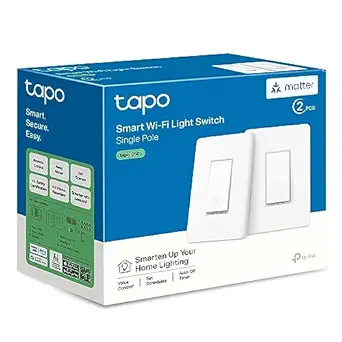 | Best Multi-Platform Switch | Model: Tapo S505 | Pack size: 2 switches | Smart home compatibility: Apple Home, Amazon Alexa, Google Home, Samsung SmartThings | VIEW LATEST PRICE | See Our Full Breakdown |
| GHome Wi-Fi Smart Plug |  | Best for Shared Household Control | Connectivity: 2.4 GHz Wi-Fi or Bluetooth | Voice assistants: Amazon Alexa, Google Assistant | Compatible apps: GHome, Smart Life, Tuya | VIEW LATEST PRICE | See Our Full Breakdown |
| Amazon Smart Plug with Alexa |  | Best for Alexa-Only Households | Dimensions: 3.2 × 1.5 × 2.2 in (80 × 38 × 57 mm) | Weight: 3.1 oz (87 g) | Input: 120 VAC, 60 Hz, 15 A max | VIEW LATEST PRICE | See Our Full Breakdown |
| Amazon Echo Show 11 (Newest Model), Smart Display with Alexa, Full-HD 11″ Touchscreen, Smart Home Hub, Graphite |  | Best Smart Home Command Center | Display: 11″ Full-HD touchscreen | Color: Graphite | Processor: AZ3 Pro chip | VIEW LATEST PRICE | See Our Full Breakdown |
| Orbitell 1080p Wireless Wi-Fi Video Doorbell Camera |  | Best Entry-Level Video Doorbell | Resolution: 1080p | Connectivity: 2.4 GHz Wi-Fi only | Audio: Two-way audio | VIEW LATEST PRICE | See Our Full Breakdown |
| Kasa Smart Plug HS103P4, Smart Wi-Fi Outlet, 4-Pack, White |  | Best Value Multi-Pack | Model: HS103P4 | Operating Voltage: 120 V AC | Wattage: 1800 watts | VIEW LATEST PRICE | See Our Full Breakdown |
| TP-Link Tapo P125M Matter Smart Plug Mini (3-Pack) |  | Best Future-Proof Pick | Model: Tapo P125M | Max Load: 15A / 1800W | Connectivity: 2.4 GHz Wi-Fi, Bluetooth onboarding | VIEW LATEST PRICE | See Our Full Breakdown |
| smart home device | Connectivity |
|---|---|
| Govee Smart Plug | Bluetooth and 2.4 GHz Wi-Fi |
| Linkind Matter Smart Plug | 2.4 GHz Wi-Fi, IPv6, Matter protocol |
| Amazon Echo Show 5 Smart Displ | — |
| Amazon Basics Smart Plug | 2.4 GHz Wi-Fi |
| Amazon Echo Dot | — |
| Amazon Smart Air Quality Monit | Works with Alexa |
| Kasa Smart Light Switch HS200 | — |
| EIGHTREE Wi-Fi Smart Plug | 2.4 GHz Wi-Fi, no hub required |
| TP-Link Tapo S505 Matter Smart | Matter, 2.4 GHz Wi-Fi |
| GHome Wi-Fi Smart Plug | 2.4 GHz Wi-Fi or Bluetooth |
| Amazon Smart Plug with Alexa | — |
| Amazon Echo Show 11 | — |
| Orbitell 1080p Wireless Wi-Fi | 2.4 GHz Wi-Fi only |
| Kasa Smart Plug HS103P4 | Wi-Fi (2.4 GHz required) |
| TP-Link Tapo P125M Matter Smar | 2.4 GHz Wi-Fi, Bluetooth onboarding |
More Details on Our Top Picks
Govee Smart Plug, 4-Pack
For buyers who want the most smart outlets per dollar without a hub, this Govee 4-pack covers the basics well. Compared with the Amazon Basics Smart Plug 4-Pack, it is the more flexible choice because it supports both Alexa and Google Assistant, not just one ecosystem — which matters if a household mixes Android phones and Fire tablets. Group control in the Govee Home app lets a single tap switch off every lamp in a room, a feature the Amazon Smart Plug handles through routines but with more setup friction.
The tradeoff is ecosystem depth: unlike the Linkind Matter Smart Plug, there is no Apple Home or SmartThings support, and no local control if Wi-Fi drops. It also lacks the 5 GHz band, so older dual-band routers need a 2.4 GHz network enabled. Still, for outfitting four outlets on a budget, this pick makes the most sense.
Pros:- Works with both Alexa and Google Assistant
- Group control and scheduling in one app
- No hub required for setup
- Compact housing leaves the second outlet usable
Cons:- No 5 GHz Wi-Fi support, which complicates setup on some modern routers
- Cloud-dependent — no offline local control like Matter plugs offer
Best for: Budget-conscious households outfitting several lamps or fans at once who use either Alexa or Google Assistant
Not ideal for: Apple Home or SmartThings users — this plug does not support Matter or those platforms
- Pack size:4 plugs
- Connectivity:Bluetooth and 2.4 GHz Wi-Fi
- Voice assistants:Amazon Alexa, Google Assistant
- Voltage:120 V
- Amperage:11 A
- Plug type:Type B
- Hub required:No
- Certifications:ETL, FCC
Our verdict“The most cost-effective way to automate four outlets across mixed Alexa and Google households, as long as Apple Home is not part of the plan.”
Linkind Matter Smart Plug
This is the plug for buyers thinking beyond a single ecosystem. Thanks to Matter support, it pairs natively with Apple Home, Alexa, Google Home, and SmartThings without juggling manufacturer apps — a genuine advantage over the Govee Smart Plug 4-Pack, which locks you into two platforms. Its standout feature is offline LAN control: lights and appliances keep responding on your local network even when the internet is down, something most cheap Wi-Fi plugs simply cannot do.
The catch is the entry barrier. Unlike the Amazon Basics Smart Plug, which works out of the box with zero extra hardware, this model demands a Matter-certified hub or controller for the major platforms — a HomePod, Echo Show 11, or similar. It also tops out at 2.4 GHz Wi-Fi. This option stands out for buyers building a multi-year, multi-platform setup rather than a quick weekend automation.
Pros:- Native Matter support across all major platforms
- Offline local control when internet is unavailable
- 15A/1800W capacity with overload and short-circuit protection
- Fire-resistant housing for high-wattage appliances
Cons:- Requires a Matter-certified hub or controller for major platforms
- Only connects to 2.4 GHz Wi-Fi networks
Best for: Smart home builders invested in Apple Home or SmartThings who want one plug standard across every platform
Not ideal for: Casual buyers with just an Echo speaker and no Matter controller — the hub requirement adds cost and complexity
- Power capacity:1800W, 15A
- Connectivity:2.4 GHz Wi-Fi, IPv6, Matter protocol
- Compatibility:Apple Home, Alexa, Google Home, SmartThings, AiDot
- Safety:Overload and short-circuit protection, fire-resistant materials
- Certification:FCC certified
- Hub requirement:Matter-certified hub required for major platforms; AiDot app works without hub
Our verdict“The right plug if you want platform independence and offline reliability, provided you already own a Matter controller.”
Amazon Echo Show 5 Smart Display, Cloud Blue
The Echo Show 5 earns its spot as a bedside or desk-sized control panel — big enough for weather, timers, and camera feeds, small enough to disappear on a nightstand. Compared with the Echo Dot (5th Gen), the 5.5-inch touchscreen adds a visual layer that pure voice cannot match: seeing a morning calendar, checking a doorbell camera, or tapping to dim lights. It also doubles as a video-call device with its 2 MP camera.
Where it falls short of the Echo Show 11 is scale and hub duties — the larger model serves as a full smart home hub with Matter support, while the Show 5 is a satellite, not a centerpiece. Watching shows on 5.5 inches is more compromise than entertainment, and smart home dashboards require compatible devices to be useful. For a private, low-footprint control point with a physical camera shutter, though, this model is better suited than either sibling.
Pros:- Touchscreen adds visual dashboards voice-only speakers cannot offer
- 2 MP camera for video calls and drop-in monitoring
- Physical camera shutter and mic/camera off button
- Compact footprint suits nightstands and small counters
Cons:- 5.5-inch screen is too small for enjoyable video watching
- No built-in smart home hub — depends on compatible devices and services
Best for: Anyone wanting a nightstand or kitchen-counter touchscreen to view cameras, run routines, and make video calls
Not ideal for: Buyers wanting a living-room media hub or whole-home Matter controller — the Echo Show 11 covers both roles better
- Display:5.5 inches
- Camera:2 MP with built-in shutter
- Smart assistant:Alexa
- Privacy features:Microphone/camera off button and camera shutter
- Color:Cloud Blue
- Recycled materials:100% post-consumer recycled polyester fabric; 100% recycled aluminum
Our verdict“A privacy-conscious mini command center for Alexa households that want visuals without the footprint of the Echo Show 11.”
Amazon Basics Smart Plug, Works with Alexa, 4-Pack, White
If your home is already Alexa-first, this 4-pack removes nearly every point of friction: plug in, open the Alexa app, done — no hub, no third-party account, no extra skill to enable. That simplicity is the whole pitch. The Govee 4-Pack offers broader assistant support, and the Linkind Matter plug adds offline control, but both ask more of the buyer during setup. Here, sunrise/sunset routines and schedules live inside the Alexa app most Echo owners already use daily.
The tradeoff is real, though: Alexa-only compatibility means a future switch to Google Home or Apple Home renders these plugs dumb. Like most budget plugs, it is 2.4 GHz Wi-Fi only. This pick makes the most sense for buyers fully committed to Amazon’s ecosystem who value zero-hassle setup over portability between platforms.
Pros:- Setup takes minutes with no hub or separate app
- Full Alexa routines, schedules, and sunrise/sunset automation
- Compact body leaves the second outlet free
- Four plugs cover a whole room for little cost
Cons:- Alexa-only — incompatible with Google Home, Apple Home, or SmartThings
- Limited to 2.4 GHz Wi-Fi networks
Best for: Echo-owning households that want four plugs working in minutes without leaving the Alexa app
Not ideal for: Mixed-platform or Google Home households — these plugs simply will not connect outside Alexa
- Connectivity:2.4 GHz Wi-Fi
- Compatibility:Amazon Alexa only
- Quantity:4-Pack
- Hub required:No
- Color:White
- Setup:Alexa app, no third-party apps needed
Our verdict“The fastest path to voice-controlled outlets for committed Alexa households, and a dead end for anyone else.”
Amazon Echo Dot (5th Gen) Smart Speaker, Deep Sea Blue
The Echo Dot remains the single easiest way to make a home ‘smart’ — it is the voice control layer that plugs like the Amazon Basics 4-Pack and thermostatic accessories all answer to. This generation adds two quiet surprises: built-in motion and temperature sensors, which enable occupancy-based routines (lights on when someone walks in) without buying extra hardware, and eero Built-in, which extends a compatible mesh network by up to 1,000 sq. ft. Unlike the cheaper plugs, it speaks Matter and dual-band Wi-Fi, making it the more future-ready anchor of a starter kit.
Audio is where expectations should be managed — a single 1.6-inch mono driver handles background music and podcasts well, but it is not a listening experience. Compared with the Echo Show 5, you lose the screen and camera entirely. As a low-cost hub-and-voice foundation, though, this model is hard to beat.
Pros:- Built-in motion and temperature sensors enable smart occupancy routines
- Matter support and dual-band Wi-Fi for broad compatibility
- Doubles as an eero mesh extender up to 1,000 sq. ft.
- Compact size fits anywhere a voice assistant is needed
Cons:- Mono speaker with modest bass — weak for serious listening
- eero Built-in requires a compatible eero router and linked accounts
Best for: First-time smart home buyers who need one affordable device to control plugs, lights, and sensors by voice
Not ideal for: Music-first listeners or buyers wanting visual dashboards — mono audio and no screen make the Echo Show 5 or a larger speaker the better spend
- Generation:5th Gen
- Speaker:1.6-inch full-range driver, mono
- Audio bandwidth:62 Hz–19 kHz
- Wi-Fi:Dual-band 802.11a/b/g/n/ac (2.4 and 5 GHz)
- Smart home compatibility:Wi-Fi, Bluetooth Low Energy Mesh, Matter
- Sensors:Motion and indoor temperature
- eero Built-in coverage:Up to 1,000 sq. ft. with compatible eero network
- Dimensions:3.9 × 3.9 × 3.5 in (100 × 100 × 89 mm)
Our verdict“The cheapest credible foundation for an Alexa smart home, provided music quality is not a priority.”
Amazon Smart Air Quality Monitor
Most smart home sensors just collect data; this one actually acts on it. By tracking five factors — PM2.5, VOCs, carbon monoxide, humidity, and temperature — it can trigger Alexa Routines that turn on an air purifier or kick the Amazon Smart Thermostat into gear when air quality dips. That closed-loop automation is something simpler plugs like the EIGHTREE 4-Pack can’t replicate on their own. The tradeoff is dependency: without an Alexa ecosystem and compatible devices, it’s just a monitor with a color-coded LED. Anyone hoping for a standalone display will be disappointed, since detailed readings live only in the app. This option makes the most sense for buyers already invested in Alexa who want invisible, hands-off air management rather than another screen.
Pros:- Tracks five air quality factors in a single device
- Real-time alerts through phone notifications or Echo announcements
- Alexa Routines let air quality data trigger purifiers, fans, and thermostats automatically
- Tool-free plug-in setup
Cons:- Full functionality depends on the Alexa app and compatible smart devices
- No full display on the device itself — only a color-coded LED
Best for: Alexa households wanting automatic air purifier, fan, or thermostat reactions to air quality changes
Not ideal for: Households without Alexa devices or compatible appliances, since core automation features won’t function
- Detected factors:PM2.5, VOCs, carbon monoxide, humidity, temperature
- Connectivity:Works with Alexa
- Alerts:Phone notifications and Echo announcements
- Display:Color-coded LED indicator
- Automation:Alexa Routines with purifiers, dehumidifiers, fans, and Amazon Smart Thermostat
- Setup:Plug in and connect via Alexa app
Our verdict“Worth buying if you live in the Alexa ecosystem and want air quality data to drive real automation, not just sit in an app.”
Kasa Smart Light Switch HS200, Single Pole
This is the proven workhorse of smart switches — a single-pole design from TP-Link’s Kasa line that nails the fundamentals: reliable app control, Alexa and Google Assistant support, and timers plus an away mode that flips lights on and off to simulate occupancy. Compared with the Tapo S505 2-Pack, the HS200 skips Matter and Apple Home support, so iPhone-centric households should step up to Tapo. But for Alexa or Google users, the HS200 delivers the same day-to-day experience with a longer track record behind it. The real barrier isn’t features — it’s the neutral wire requirement, which rules out older homes, and anyone uncomfortable around a breaker box will need an electrician. Renters should skip it entirely and grab a plug like the Kasa HS103P4 instead.
Pros:- Dependable remote control through the polished Kasa app
- Works with both Amazon Alexa and Google Assistant
- Timers, countdowns, and away mode for security-style lighting
- UL certified with a well-established installation history
Cons:- Neutral wire required, excluding many older homes
- Needs a 2.4 GHz Wi-Fi network
- Installation may require an electrician for non-DIYers
Best for: Homeowners with neutral wiring who want reliable Alexa or Google lighting control at the wall
Not ideal for: Renters and owners of older homes without neutral wires — a smart plug is the easier route
- Model:HS200
- Switch type:Single pole
- Wiring requirement:Neutral wire required
- Wi-Fi requirement:2.4 GHz
- Voice assistants:Amazon Alexa, Google Assistant
- Dimensions:4.13 × 1.71 × 1.74 in (without panel)
- Certification:UL certified
Our verdict“The safest bet for Alexa or Google households modernizing wall switches, provided your wiring cooperates.”
EIGHTREE Wi-Fi Smart Plug, 15A, 4-Pack
If the goal is dipping a toe into smart home tech without rewiring anything, this four-pack is the lowest-friction entry point in the lineup. There’s no hub, no neutral wire, no electrician — just Bluetooth-assisted pairing through the Smart Life app and you’re scheduling lamps, fans, and coffee makers. Compared with the Amazon Basics Smart Plug 4-Pack, EIGHTREE matches the 15A/1800W capacity while adding SmartThings compatibility and a compact body that leaves the second outlet free. The compromises are familiar budget-plug territory: 2.4 GHz Wi-Fi only, and you must complete setup in Smart Life before Alexa or Google will see the plugs. Buyers planning a multi-platform, Matter-based home should look at the Linkind or Tapo P125M instead — this pack is built for simple, single-ecosystem households.
Pros:- Four plugs with full 15A / 1800W capacity for demanding appliances
- Scheduling, timers, countdowns, and cycles built in
- No hub required, with Bluetooth-assisted setup
- Compact housing fits tight outlets and power strips
Cons:- Setup must go through the Smart Life app before linking voice assistants
- 2.4 GHz Wi-Fi only, which can complicate mesh networks
Best for: First-time smart home buyers who want to automate several appliances cheaply with zero installation
Not ideal for: Buyers building a Matter-based, multi-platform smart home — there’s no Matter or Thread support here
- Quantity:4 plugs
- Operating voltage:120 V
- Max wattage:1800 W (15A)
- Connectivity:2.4 GHz Wi-Fi, no hub required
- App:Smart Life
- Voice assistants:Amazon Alexa, Google Assistant
- Smart home compatibility:SmartThings
- Certifications:ETL, FCC
Our verdict“The cheapest legitimate way to make four dumb appliances smart — ideal for a first apartment setup.”
TP-Link Tapo S505 Matter Smart Light Switch, 2-Pack
This is the switch for households where the smart home isn’t one ecosystem — it’s three. Thanks to Matter support, the S505 works natively with Apple Home, Alexa, Google Home, and SmartThings, and can even be managed across platforms simultaneously. Its sharpest edge over the Kasa HS200 is local network control: lights keep responding to schedules and voice commands even when the internet drops, which cloud-dependent switches can’t promise. The two-pack format also makes whole-room upgrades more economical. The tradeoffs mirror Kasa’s — a neutral wire and 2.4 GHz Wi-Fi are required, and installation is still real electrical work. If you’re all-in on Alexa exclusively, the HS200 does the same job with fewer setup steps; the S505 earns its premium positioning only when multi-platform flexibility genuinely matters.
Pros:- Native Matter support across Apple Home, Alexa, Google Home, and SmartThings
- Local network control keeps schedules and voice commands working offline
- Manageable from multiple smart home systems at once
- Two-year warranty with UL certification
Cons:- Neutral wire required, excluding older wiring
- Electrical installation may require an electrician
- 2.4 GHz Wi-Fi only
Best for: Mixed-device households — especially Apple Home users — who want wall switches that work everywhere
Not ideal for: Single-ecosystem Alexa or Google users who’d get identical results from the cheaper Kasa HS200
- Model:Tapo S505
- Pack size:2 switches
- Smart home compatibility:Apple Home, Amazon Alexa, Google Home, Samsung SmartThings
- Connectivity:Matter, 2.4 GHz Wi-Fi
- Wiring:Neutral wire required
- Switch type:Single pole
- Input voltage:100–120 VAC, 50/60 Hz
- Current:15 A
- Certification:UL certified, 2-year warranty
Our verdict“The right switch when your household spans Apple, Alexa, and Google — overkill if it doesn’t.”
GHome Wi-Fi Smart Plug
What separates this plug from the EIGHTREE and Amazon Basics packs is its group control and family sharing — one plug or a whole cluster can be managed by everyone in the household through their own phones, which makes it a fit for shared apartments or family rooms where multiple people need to toggle the same devices. Flexibility extends to software too: it works with the GHome, Smart Life, or Tuya apps, so you’re not locked into one ecosystem’s tooling. Voice control through Alexa and Google Assistant covers the basics, alongside schedules and timers. It doesn’t match the Tapo S505’s Matter-level platform freedom, and it still demands the usual GHome app setup before voice linking plus a 2.4 GHz network. For single users, the EIGHTREE four-pack offers better value; this one is built for collaboration.
Pros:- Group control lets multiple devices switch together
- Family sharing spreads control across household members without account juggling
- Choice of three apps (GHome, Smart Life, Tuya) avoids software lock-in
- Works with both Alexa and Google Assistant
Cons:- Must be set up in the GHome app before connecting voice assistants
- 2.4 GHz Wi-Fi network required
- No Matter support for cross-platform smart homes
Best for: Roommates or families who need several people controlling the same appliances from their own phones
Not ideal for: Solo users who’d get more value from a multi-pack like the EIGHTREE 4-Pack
- Connectivity:2.4 GHz Wi-Fi or Bluetooth
- Voice assistants:Amazon Alexa, Google Assistant
- Compatible apps:GHome, Smart Life, Tuya
- Control methods:Remote, voice, group control
- Features:Schedules, timers, family sharing
- Hub required:No
Our verdict“A sensible pick when multiple people need shared control of the same appliances — skip it if you’re automating solo.”
Amazon Smart Plug with Alexa
This plug makes the most sense for buyers already living inside the Alexa ecosystem, because it trades cross-platform flexibility for friction-free setup. Where the Kasa HS103P4 splits its support between Alexa and Google, this one goes all-in on Alexa — meaning faster onboarding in the Alexa app, tighter routine integration, and automatic reconnection after power or Wi-Fi drops, which cheaper multi-packs often fumble. The compact housing leaves the second outlet free, a small detail the bulkier GHome plug gets wrong. The tradeoff is real, though: if you ever switch to Google Home or Apple Home, these plugs become dumb outlets. Pair it with the Echo Show 11 and it behaves like a native extension of your voice setup.
Pros:- No hub required — setup flows directly through the Alexa app
- Automatically reconnects after power or Wi-Fi outages
- Compact body keeps the second outlet usable
- Deep integration with Alexa routines, timers, and schedules
Cons:- Alexa-only compatibility locks you into Amazon’s ecosystem
- 2.4 GHz Wi-Fi support only
- Indoor use only — no weather sealing for patios or garages
Best for: Alexa households that want plug-and-play outlet automation with zero configuration headaches
Not ideal for: Mixed-ecosystem homes or anyone considering a future switch to Google Home or Apple Home
- Dimensions:3.2 × 1.5 × 2.2 in (80 × 38 × 57 mm)
- Weight:3.1 oz (87 g)
- Input:120 VAC, 60 Hz, 15 A max
- Wi-Fi:2.4 GHz, 802.11 b/g/n
- Compatibility:Alexa only; no other assistants or hubs
- Use:Indoor
- Warranty:1-year limited
Our verdict“Buy this if Alexa runs your home and you want the simplest possible single plug; skip it the moment multi-platform support matters.”
Amazon Echo Show 11 (Newest Model), Smart Display with Alexa, Full-HD 11″ Touchscreen, Smart Home Hub, Graphite
This option stands out as the roundup’s central nervous system rather than another accessory. The 11-inch Full-HD screen offers 60% more viewing area than the Echo Show 8, and the built-in smart home hub means it can coordinate plugs, cameras, and lights directly — effectively replacing a separate hub purchase. Compared with the Echo Dot (5th Gen), which handles voice alone, the Show 11 adds camera feeds, auto-framing video calls, and Omnisense presence detection, so routines can react to who’s actually in the room. Spatial audio with up to 2x the bass of the previous generation makes it a legitimate kitchen speaker. The compromise: it demands counter space and, like the Amazon Smart Plug, it anchors your entire setup to Alexa.
Pros:- Built-in smart home hub eliminates a separate hub purchase
- Large Full-HD display with 60% more viewing area than Echo Show 8
- Room-filling spatial audio with up to 2x previous-generation bass
- Physical mic/camera disable button and dedicated privacy controls
Cons:- Locked to the Alexa ecosystem for assistant and smart home features
- Larger footprint unsuitable for tight counters or bedside tables
Best for: Homeowners building an Alexa-centered smart home who want one device to control cameras, plugs, and displays
Not ideal for: Small apartments or nightstands where the footprint is impractical, or households committed to Google or Apple assistants
- Display:11″ Full-HD touchscreen
- Color:Graphite
- Processor:AZ3 Pro chip
- Smart Home Hub:Built-in
- Camera:Centered, auto-framing, 3.3x zoom
- Audio:Spatial audio, up to 2x bass vs Echo Show 8 (2023)
- Smart Technology:Omnisense temperature, presence, and visual ID detection
- Streaming:Prime Video, Netflix, and more
Our verdict“If you want a single screen-and-hub device running your whole smart home, this is the anchor worth building around.”
Orbitell 1080p Wireless Wi-Fi Video Doorbell Camera
This is the roundup’s only device watching your front door, and its strength is filtering noise before it reaches you. The AI person detection ignores passing cars and animals, so alerts mean something — a problem cheaper motion-only doorbells never solve. Compared with the Echo Show 11, which excels indoors, the Orbitell’s IP65 weather resistance means it lives outside year-round, and its two-way audio handles package deliveries without opening the door. Night vision via infrared LEDs keeps coverage usable after dark. Two tradeoffs temper the value: it clings to 2.4 GHz Wi-Fi only, and pre-capture recording — the seconds of footage before a trigger — sits behind a cloud subscription, so budget-minded buyers get a more limited experience out of the box.
Pros:- AI person detection filters out vehicles and animals
- Two-way audio with real-time smartphone alerts
- Infrared night vision with wide-angle coverage
- IP65 weather resistance for outdoor durability
Cons:- 2.4 GHz Wi-Fi only — incompatible with 5 GHz networks
- Pre-capture recording requires a paid cloud subscription
- Encrypted storage is cloud-based with no local option
Best for: First-time buyers who want person-specific alerts and basic porch monitoring without a wired installation
Not ideal for: Owners of 5 GHz-only networks, or anyone unwilling to subscribe for full cloud recording features
- Resolution:1080p
- Connectivity:2.4 GHz Wi-Fi only
- Audio:Two-way audio
- Night Vision:Infrared LEDs
- Cloud Storage:AES-128 encrypted; pre-capture for subscribers
- Motion Detection:AI person detection; filters vehicles and animals
- Weather Resistance:IP65
Our verdict“A sensible starter doorbell if you want fewer false alerts and can live without subscription perks.”
Kasa Smart Plug HS103P4, Smart Wi-Fi Outlet, 4-Pack, White
For outfitting several rooms at once, this 4-pack beats the single Amazon Smart Plug on pure coverage-per-dollar, and unlike that Alexa-only rival, it works with both Alexa and Google Assistant — a genuine hedge if your household mixes assistants. Setup skips hubs entirely through the Kasa app, and scheduling, timers, and countdowns handle the common jobs: lamps at dusk, fans at bedtime, humidifiers on a cycle. The UL certification matters more than it sounds when a plug runs unattended behind furniture for years. Against the Tapo P125M, it lacks Matter and Apple Home support, and it doesn’t offer local control — if your internet drops, remote features drop with it. For straightforward on/off automation, though, those are tradeoffs most buyers never feel.
Pros:- Dual voice support for both Alexa and Google Assistant
- No hub required with quick setup via the free Kasa app
- Remote control, scheduling, timers, and countdowns from anywhere
- UL certified for electrical safety
Cons:- 2.4 GHz Wi-Fi required; incompatible with 5 GHz-only networks
- No Matter support and no Apple Home compatibility
- No local LAN control — features depend on internet connectivity
Best for: Budget-conscious buyers automating multiple lamps, fans, and small appliances across several rooms
Not ideal for: Apple Home users or anyone wanting offline local control during internet outages
- Model:HS103P4
- Operating Voltage:120 V AC
- Wattage:1800 watts
- Connectivity:Wi-Fi (2.4 GHz required)
- Controller Type:Amazon Alexa, Google Assistant
- Certification:UL Certified
- Quantity:4-Pack
- Compatibility:Android 5.0+, iOS 10.0+
Our verdict“The most practical pick for whole-home outlet automation on a budget, as long as Apple devices aren’t in the picture.”
TP-Link Tapo P125M Matter Smart Plug Mini (3-Pack)
This model makes the most sense for buyers who refuse to bet on a single ecosystem. Matter support means one plug works with Apple Home, Alexa, Google Home, and SmartThings — a flexibility neither the Kasa HS103P4 (Alexa/Google only) nor the Amazon Smart Plug (Alexa only) can match. The standout feature for reliability-minded users is local LAN control: schedules keep firing even when your internet goes down, something cloud-dependent plugs simply can’t promise. Bluetooth onboarding speeds up first-time setup, and the mini housing avoids blocking adjacent outlets. The catch is that some platforms require a Matter-compatible hub or controller for full voice control — an extra cost or an existing device like the Echo Show 11 filling that role — and it’s still 2.4 GHz only.
Pros:- Matter support across Apple Home, Alexa, Google Home, and SmartThings
- Local LAN control keeps schedules running during internet outages
- Compact design avoids blocking adjacent outlets
- UL-certified flame-retardant construction with 2-year warranty
Cons:- 2.4 GHz Wi-Fi only; no 5 GHz support
- Full voice control may require a Matter-compatible hub or controller
- Three plugs per pack costs more per outlet than basic 4-packs
Best for: Multi-platform households, especially Apple Home users, who want ecosystem flexibility and offline reliability
Not ideal for: Buyers wanting the lowest cost per plug or those without any Matter controller on hand
- Model:Tapo P125M
- Max Load:15A / 1800W
- Connectivity:2.4 GHz Wi-Fi, Bluetooth onboarding
- Protocol:Matter
- Compatible Platforms:Apple Home, Alexa, Google Home, SmartThings
- Certification:UL certified, flame retardant
- Quantity:3-Pack
- Warranty:2-year limited
Our verdict“The pick for anyone who wants plugs that survive ecosystem switches and internet outages alike — provided a Matter hub is already in the home.”
How We Picked
I compared the 15 devices by the job they do in a smart home, how easily they can fit into common setups, and the tradeoffs buyers take on. For plugs, I focused on platform compatibility, form factor, pack size, and whether the description specifies a hub requirement. For speakers and displays, I weighed screen size and the combination of voice control and smart home functions; for switches, I considered installation requirements and whether the device suits fixed lighting. I also looked at the specialized roles of the air quality monitor and video doorbell rather than treating them as substitutes for everyday controls.
The ranking favors devices that serve a clear need while remaining broadly useful. That places the Matter-enabled Tapo P125M first for its mix of compact form and ecosystem flexibility, while the Echo Show 11 leads the display category and the Kasa HS103P4 is a straightforward multi-outlet option. Devices with narrower platform fit, more installation demands, or a specialized purpose rank lower for a general roundup, though they may be the better choice for a buyer whose home matches their strengths. Product descriptions alone do not establish long-term reliability or performance in every household, so I avoid making claims that require hands-on testing.
Factors to Consider When Choosing Smart Home Devices
Before choosing smart home devices, I would map the home around routines and compatibility rather than buying a pile of connected gadgets. These broader questions can help prevent mismatched devices, redundant hubs, and purchases that create more setup work than convenience.
Start With Your Existing Platform
List the voice assistants, apps, and smart home controllers already used in your home before comparing device features. A device that advertises Alexa compatibility may not offer the same experience through Google Home or another platform. Matter support can widen compatibility, but it does not remove the need to check which controllers and features a particular device supports. Households with more than one phone ecosystem should pay extra attention to setup and shared control. Avoid assuming that two devices will cooperate simply because both connect to Wi-Fi. A little compatibility checking can save you from managing separate apps for every room.
Choose the Right Kind of Control
Smart plugs are a low-commitment way to control compatible plug-in lamps and appliances, while wall switches make more sense when you want the room’s built-in lighting controlled at the switch. Neither automatically makes every connected device smart: appliances with their own controls may not reliably resume operation when power returns. Think about whether people in the home still need to use a physical switch or button. Permanent switch installation may involve wiring checks or an electrician, so factor that work into your decision. A plug can be easier to move, but it occupies an outlet and may block a neighboring socket. Match the device to the behavior you want to automate.
Check Wiring Before Buying a Light Switch
Smart switches can make fixed lighting part of routines, but wiring compatibility is a purchase requirement, not a detail to sort out afterward. Some models specify a neutral wire, and older homes or particular switch boxes may not have one available. Check the product’s wiring directions and inspect the switch box safely before ordering. Also confirm whether the switch is intended for the circuit type and lighting setup in your room. A smart bulb paired with a regular switch may be a simpler option when switch wiring is unsuitable, though someone turning off the physical switch can interrupt smart control. The right choice depends on the room’s existing wiring and how people use its lights.
Decide Whether a Display Adds Enough Value
A smart display gives voice control a visible interface for things like household information and device controls, but it takes more space and keeps a screen in the room. A compact display can suit a bedside table or small counter, while a larger model may be easier to view across a kitchen or shared area. A speaker without a screen can cover voice commands in rooms where visual information is not useful. Consider who will use the device and whether they prefer touch, voice, or a phone. Review camera and microphone controls if privacy in that room matters to your household. Buying a screen for every room can add clutter without making routines more convenient.
Plan for Wi-Fi, Outlets, and Device Density
Smart plugs need both a usable outlet and a reliable connection where you plan to use them. Before buying a multi-pack, count the target outlets and check whether neighboring sockets, furniture, or large adapters will obstruct access. A compact plug may solve spacing issues that a larger model creates. Many Wi-Fi devices can also increase the load on a home network, especially when cameras, speakers, and displays are added alongside plugs. Check the manufacturer’s network requirements and your router’s capacity if coverage is already unreliable. Addressing dead zones first can make setup and daily control more dependable.
Buy Specialized Sensors and Cameras for a Specific Job
An air quality monitor and a video doorbell answer different questions from switches, plugs, and speakers, so buy them to solve a defined household need. Decide which readings or camera features matter before comparing product names alone. For a doorbell, check the existing wiring or battery arrangement, Wi-Fi signal at the entry, and how recordings are stored or accessed. For an air monitor, identify which environmental measurements it reports and where it should sit to produce useful readings. Privacy settings and the handling of household data deserve attention for devices that monitor rooms or entrances. If you cannot name the routine or decision the device will support, it may add notifications without much practical benefit.
Frequently Asked Questions
Will a Matter smart plug work with every smart home system?
Matter is designed to make supported devices work across participating smart home platforms, but the exact experience still depends on your controller, app, and the device’s feature support. Check that your smart home hub or speaker supports Matter and that the plug’s instructions list your platform. Some setup steps or advanced controls may still be handled in a manufacturer’s app. If you rely on a particular automation, verify that it is available through your chosen controller. Matter can reduce ecosystem lock-in, but it does not guarantee that every feature appears everywhere.
Should I choose a smart plug or replace my wall switch?
Choose a plug when you want a reversible way to control a compatible lamp or appliance and have an available socket. A wall switch is a better match for built-in ceiling or wall lighting that should remain controllable from the usual switch location. Before choosing a switch, check the wiring requirements and confirm the device suits the circuit. Consider how other household members will operate the light or appliance manually. A plug is simpler to relocate, while a switch can give fixed lighting a more natural place in your home’s routines.
Do I need an Echo display if I already have a smart speaker?
A display makes sense when you will use a visible interface for household controls or information, or when touch interaction helps people who do not want to rely on voice commands. If your main goal is voice control for plugs and lights, a screenless speaker may cover that need with less counter or bedside space. The Echo Show 5 is the smaller-screen option here, while the Echo Show 11 suits buyers who want a larger display and smart home hub in one device. Consider the room, viewing distance, and privacy preferences before adding a screen. A display is most useful when its visual role is part of a routine you expect to use.
Can I use a smart plug with any appliance?
No: a smart plug controls power to an outlet, so it works best with devices that resume their intended state when power is restored. Check the appliance’s controls and manufacturer guidance before connecting it. A plug does not give an appliance new controls for settings such as temperature or speed. Avoid using a smart plug with equipment whose safe operation depends on uninterrupted power or supervised controls unless its maker approves that use. For a lamp or another simple device, confirm the physical switch can remain in the on position.
What should I check before buying a video doorbell?
Start with the doorbell’s power requirements and whether your current wiring or entry setup supports them. Check Wi-Fi strength where the doorbell will be installed, since a strong connection indoors may not reach the entrance reliably. Find out how the camera’s recordings, alerts, and storage work, including whether important features need a separate service. Review the camera’s view and privacy controls for your doorway and nearby shared spaces. Also make sure the device and its mounting arrangement suit the door and weather exposure at your home.
Conclusion
For most shoppers, I recommend the TP-Link Tapo P125M Matter Smart Plug Mini as the best overall pick because its compact form and Matter support suit a range of connected homes. The Kasa HS103P4 is my best value-style choice for buyers who want several everyday smart outlets in one package, while the Echo Show 11 is the premium fit for those who want a large-screen control point with a smart home hub. Beginners who already use Alexa may prefer the Amazon Smart Plug for a simple ecosystem match, though buyers using other platforms should check compatibility first. Choose the Kasa HS200 or Tapo S505 for fixed lighting after confirming wiring; pick the Amazon Smart Air Quality Monitor or Orbitell doorbell when environmental readings or entry video are the specific need. The right device is the one that fits your platform, room, and routine without adding controls you will not use.
NFL season / tailgating Picks
team gear
As an affiliate, we earn on qualifying purchases.